
Free Invoice Generator — Create and Download Invoices
Our free invoice generator lets you create professional invoices for any business in under 60 seconds. Use our invoice maker tool in 3 simple steps:
- Choose template
- Fill in details
- Download, Share, Print or Email
Invoice Generator
Design
Company Information
Invoice Details
Client Information
Invoice Items
Charges & Notes
Signature
Upload PNG, JPG
What is an Invoice Generator?
An invoice generator helps you create, customize, and download professional invoices in seconds. This free online tool allows freelancers, small businesses, and contractors to generate accurate invoices with automatic calculations, tax support, and ready-to-use invoice templates.
Create an invoice online using our invoice maker, add your business details, include client information, and download a printable PDF invoice instantly.
How to Use the Invoice Generator?
Step-1: Choose Your Invoice Template
Pick the template that best fits your invoice type and brand style. Adjust colors, fonts, and layout.
Step-2: Add Your Business Details
Enter your business name, logo, address, phone number, email. Your logo will appear prominently on every invoice, reinforcing your brand with every transaction.
Step-3: Fill in Invoice Details
Add the invoice number, invoice date, due date for payment and currency in which you will get payment.
Step-4: Add Your Customer Details
Add customer name and customer address.
Step-5: Add Items and Pricing
List your products or services with quantities and prices. Apply tax rate (VAT, GST, sales tax), add discounts or shipping if applicable, and the tool automatically calculates your subtotal and grand total instantly.
Step-6: Download or Share
Export your finished invoice as a PDF, PNG, or JPEG. Print directly, send via Email, or share instantly through WhatsApp, straight to your customer in seconds. No account required.
Who uses an invoice generator?
- Freelancers billing clients for completed work
- Consultants issuing invoices for professional services
- Small business owners managing customer payments
- Contractors invoicing for labor and materials
- Tutors and coaches billing students or clients
- Photographers, designers, and creatives charging for projects
- Tradespeople — plumbers, electricians, mechanics — billing after a job
- Landlords issuing monthly rent invoices to tenants
- Retailers creating sales invoices for wholesale buyers
Freelance Invoice Template and Generator
Freelancers get paid on the strength of their invoices, and a vague one is the
most common reason a payment sits unpaid for weeks. If a client cannot tell
what they are being billed for, the invoice goes to the bottom of the pile
rather than into the payment run.
Our freelance invoice generator produces a clean, itemised invoice for
freelance work in under a minute, with the fields self-employed billing
actually needs.
What a Freelance Invoice Should Include?
Freelance Invoice Example
A copywriter billing for a finished project might list "Long-form article,
2,000 words, including one revision round — $450" as a single line, then
"Additional revision round (agreed 14 March) — $90" as a second, with a
subtotal, tax and total beneath. Two lines, but the client can see exactly
what changed and why the figure is what it is.
Compare that with a single line reading "Writing services — $540". Same
amount, far more likely to be queried.
Who This Suits?
The freelancer invoice templates work for any self-employed discipline — writers, designers, developers, photographers, consultants, translators, marketers and trades. Pick a template, add your logo, set your currency from 60+ supported, and download as PDF, PNG or JPEG, or send it straight to the client by email or WhatsApp.
Invoice Numbers: How to Number Your Invoices
Every invoice needs its own number, and it needs to be unique. It is how a client references the invoice when paying or querying it, how your accountant reconciles income, and how a tax authority checks nothing is missing.
The rules are simple:Common formats that work well:
The built-in invoice number generator suggests the next number automatically, so the sequence stays intact without you tracking it manually. You can override it at any time if you are continuing a series from elsewhere.
Why Choose This Invoice Maker Tool?
This free online invoice maker tool stands out with powerful features and ease of use:
- No watermark
- No account required
- Instant invoice creation
- Automatic calculations
- Professional templates
- Multi-format downloads
- Multi-currency support
It combines speed, flexibility, and professional output in one simple tool.
Invoice vs Receipt — What Is the Difference?
The two most commonly confused business documents are the invoice and the receipt. They serve entirely different purposes at different stages of a transaction.
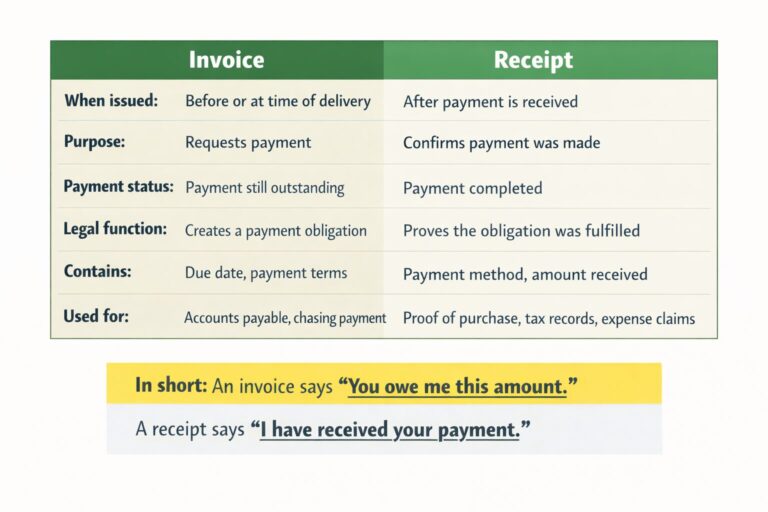
Many businesses need both documents. A freelancer sends an invoice, the client pays, and the freelancer then issues a receipt to confirm the transaction is complete. For retail transactions, only a receipt is needed. For service businesses with deferred payment, only an invoice may be required until payment clears.
→ For more detail Read our full guide: What’s the difference between a receipt and an invoice?
→ If you want to create receipt visit our Receipt Maker
Frequently Asked Questions
Q: What is an invoice generator?
A: An invoice generator is a tool that helps you create invoices automatically using structured fields and templates.
Q: Is this invoice generator free?
A: Yes, it is completely free with no watermark or account required.
Q: Can I add my business logo to invoices?
A: Absolutely! Our invoice generator makes it easy to upload your business logo in PNG, JPG, or SVG format. Your logo will appear prominently on your invoice, helping reinforce your brand identity with every transaction.
Q: Can I download invoices in different formats?
A: Yes, you can download invoices as PDF, PNG, or JPEG. You can also send invoice to customers through email, or share through Whatsapp.
Q: Can I customize the invoice templates?
A: Yes! Every invoice template in our tool is fully customizable. Modify colors, fonts, include your business information, change currencies, adjust tax rates, and personalize every element to match your needs.
Q: What currencies does the invoice maker support?
A: Our invoice maker supports 60+ global currencies including US Dollar, Euro, British Pound, Japanese Yen, Canadian Dollar, Australian Dollar, and many more. Tool also auto selects your currency according to your location. You can also choose currency manually if you want to send invoice to your customer from other countries.
Q: Can I add a signature to my invoice?
A: Yes, you can draw your signature on screen or upload a digital signature.
Q: Can I use this as a freelance invoice generator?
A: Yes. Add your name or trading name, itemise the work with your rate and any expenses, set your payment terms and due date, and download the invoice as a PDF. It suits any self-employed discipline — writing, design, development, photography, consulting or trades.
Q: What should my first invoice number be?
A: Anything you like, as long as it is consistent from then on. INV-001 or 2026-001 are both fine. What matters is that every subsequent invoice follows in sequence with no gaps and no repeats. The generator suggests the next number for you, and you can override it if you are continuing an existing series.
Q: Do I send a receipt after the client pays the invoice?
A: It is good practice, and clients often ask for one. Once payment clears you can issue one with our receipt maker. The invoice requests the money; the receipt confirms it arrived.
Use our invoice maker to create professional invoices in seconds. Customize your design, add your details, and download your invoice instantly.
Start Creating Your Invoice Now
This invoice maker is for legitimate business and record-keeping purposes only. Fraudulent activities are illegal. See our terms and Conditions