
Tutor Receipt Generator — Private Lessons, Online Classes and More
Whether you work with a single student or run a language school with fifty enrolled learners, every payment you receive deserves a written record that reflects the professionalism of what you do. Our free tutor receipt generator gives you seven purpose-built templates covering every teaching context — private tutoring, academies, online classes, music lessons, fitness coaching, language classes, and art instruction. Download as PDF or PNG instantly, no account needed.
Tutor Receipt Generator
✓ Free ✓ No watermark ✓ No account needed
Receipt Style
Business Info
Receipt Info
Customer Info
Line Items
Charges & Taxes
Notes & Footer
Why Tutors and Coaches Need a Proper Receipt
Most tutors think of a receipt as something they hand over because it feels courteous. The families and students they work with often need it for reasons that are far more specific.
Parents whose children receive specialized tutoring for a diagnosed learning disability may be able to deduct those expenses as a medical expense on their federal tax return. The IRS allows this deduction when the tutoring is recommended by a doctor for a child with a medically diagnosed condition, and when total medical expenses exceed 7.5 percent of adjusted gross income. A receipt that shows the tutor’s name, the student’s name, the subject, the date, and the amount paid is the documentation that supports that deduction if a return is ever reviewed.
For tutors themselves, every receipt is an income record. A private tutor who sees students across the week and does not issue receipts has no paper trail of earnings. If self-employment income is ever questioned by a tax authority, receipts are the evidence that fees were received and what they were for. They also make quarterly estimated tax payments easier to calculate because the income history is clear rather than pieced together from bank transfers and memory.
For corporate employees whose employers offer a tuition assistance benefit, a properly formatted receipt for an online course, a language class, or a professional coaching engagement may be required before the benefit is paid out. A receipt on company letterhead style with course name, provider, sessions completed, and amount paid is often the minimum an HR department will accept.
And for parents who pay for tutoring out of a dependent care or education flexible spending account, the FSA administrator will ask for documentation before approving the reimbursement. A well-formatted receipt is what makes that process smooth rather than drawn out.
A receipt is not a formality for the tutor. It is an important document for the person on the other side of the transaction.
Generate Your Tutoring Receipt in Minutes
Our tutor receipt generator is built around how tutoring and coaching are actually billed. Each template reflects the billing context of that specific teaching type — session-based billing for private tutors, course and enrollment details for academies, platform and timezone for online classes, instrument and repertoire for music lessons, session packs and expiry dates for fitness coaches, proficiency level and schedule for language classes, and medium and supplies for art instructors.
Fill in the details, preview the receipt in real time, and download a finished PDF or PNG the moment it looks right. Every template supports logo upload, itemized lesson or session fees, payment method, tax, discount, and digital or drawn signatures. The entire process takes under two minutes.
7 Tutor Receipt Templates — One for Every Teaching Context
1. Private Tutor Receipt
For independent tutors, home tutors, academic coaches, and anyone teaching one student or a small group in person. The Private Tutor template uses a parchment background with a purple accent and an italic serif font — understated and professional, the kind of document a parent files away rather than discards.
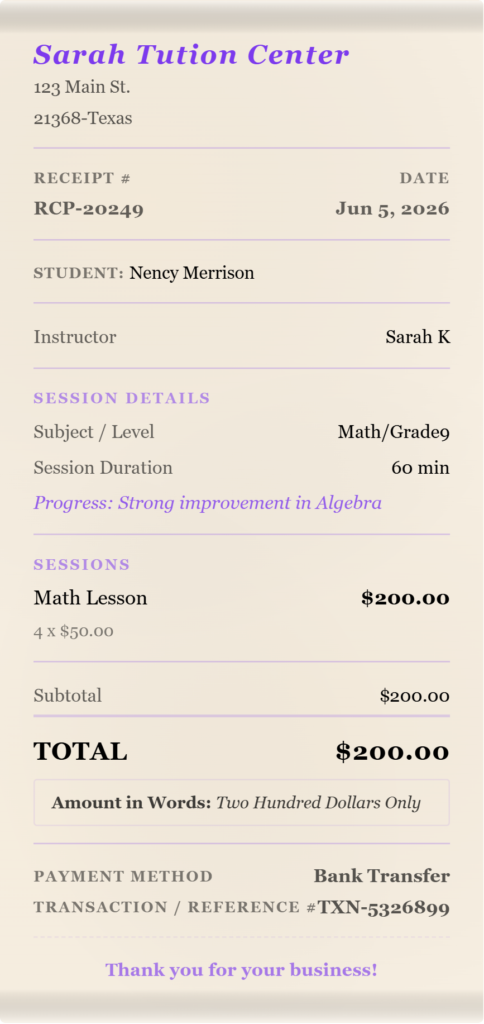
What this template captures:
Student name — the receipt is tied to the specific learner, not just the family account. When a household has two children with different tutors or different subjects, having the student name on each receipt prevents any confusion at tax time or during an FSA reimbursement review.
Subject and level — recorded as a combined field under “Subject / Level.” For a tutor covering Year 9 Mathematics or Advanced SAT Reading Comprehension, this field documents exactly what was taught and at what academic level. This is the detail that distinguishes a tutoring receipt from a generic service receipt.
Session duration in minutes — the length of the session is shown on the receipt alongside the fee. For parents calculating an hourly rate or comparing costs between providers, having the duration documented means there is no ambiguity about whether a 45-minute session was billed at the same rate as a 60-minute one.
Progress note — displayed as an italic note directly on the receipt. This is the field that makes the Private Tutor template stand apart from every generic receipt form. Rather than handing a parent a document that says only “Tutoring: $60,” the tutor can write a brief note about what the student covered and how they are progressing. Parents value this immensely. It signals that the session was productive, gives the family something to reference until the next appointment, and turns a payment receipt into a lightweight session summary that strengthens the client relationship.
The items section is labeled “Sessions”, billing naturally for a session-based teaching relationship.
2. Academy Receipt
For tutoring centers, learning academies, supplementary education schools, test preparation centers, and any organized institution billing for enrolled programs. The Academy template uses a wide table layout on linen paper with a navy blue accent and a centered uppercase heading, formal and institutional, the document style that education centers and parents both expect from an organized school environment.
What this template captures:
Course or program name — the full title of the course the student is enrolled in, displayed under “Course / Program.” For a center running SAT Prep, Year 6 Mathematics Extension, or English as a Second Language Level 3, this field clearly identifies which program the fee applies to.
Student ID — the center’s internal reference number for the enrolled student. For academies with multiple students and complex billing cycles, the student ID ties the receipt to the enrollment record without relying on name matching alone. It also makes the receipt useful for parents who need to reference a specific account when querying a bill.
Grade or year level — the academic year of the enrolled student, recorded under “Grade / Year.” Useful for centers that structure programs by academic year and bill differently by level.
Term — the academic term the receipt covers: Fall, Spring, Summer, or Academic Year. Term-based billing is the standard for most tutoring academies, and having the term on the receipt means the parent knows exactly which enrollment period they have paid for.
Enrollment period — the specific date range of the enrollment, shown as a formatted date field. For parents who have paid in advance for a semester, the enrollment period confirms the exact start and end dates covered by the payment.
The items section is labeled “Courses / Fees” on this template, appropriate for an institutional billing context where multiple course fees and administrative charges may each appear as separate line items.
3. Online Class Receipt
For online tutors, e-learning instructors, virtual course providers, and any educator delivering sessions over Zoom, Google Meet, Microsoft Teams, or a dedicated learning platform. The Online Class template uses a clean split-header layout on a white background with a sky blue accent and a subtle dot pattern, contemporary and digital in feel, appropriate for a service that is delivered entirely through a screen.
What this template captures:
Course or subject — the name of the course or subject taught during the billing period, displayed under “Course / Subject.”
Sessions this month — the number of live sessions completed during the billing period. For monthly billing arrangements where the fee covers a set number of sessions, this field documents how many were delivered and paid for. If a session was cancelled and rescheduled, the count reflects what actually took place.
Platform — the video conferencing or learning platform used: Zoom, Google Meet, Microsoft Teams, Skype, or any other service. For students who use multiple platforms for different providers, having the platform on the receipt helps them match the session to the right account and booking.
Timezone — the timezone in which sessions were scheduled and delivered. For international students, cross-border tutoring arrangements, and online language classes where tutor and student are in different countries, the timezone field removes any ambiguity about the session schedule and confirms the agreed meeting time in writing.
This is the only template in the tutor category with a timezone field, which reflects the genuinely global nature of online education. A receipt for an English tutoring session delivered from London to a student in Singapore should document that both parties were operating to the same schedule. The timezone field makes that explicit.
4. Music Lesson Receipt
For piano teachers, guitar instructors, violin teachers, vocal coaches, drum tutors, and any music educator billing for private or group lessons. The Music Lesson template uses an aged-paper texture with a warm amber italic serif font, star separators, and a torn edge, warm and musical in character, the kind of receipt a music teacher would be proud to hand over after a lesson.
What this template captures:
Instrument — the instrument the student is learning, shown under “Instrument.” For a music teacher who teaches multiple instruments, this field confirms which instrument the lesson fee applies to. For a student who takes piano on Tuesdays and guitar on Thursdays, each receipt clearly identifies the lesson.
Grade or level — the examination grade or informal skill level of the student, displayed under “Grade / Level.” For students working toward an ABRSM, Trinity, or RCM examination, having the grade on the receipt creates a consistent record of their progress through the qualification system.
Repertoire — the pieces or exercises the student is currently working on, shown under “Repertoire.” This field does what the progress note does on the Private Tutor template but in the specific language of music education. A parent whose child is preparing Beethoven’s Sonatina in G or a Grade 4 scales set will appreciate seeing that noted on the receipt. It confirms the lesson content and gives the family a reference point to support practice at home.
Upcoming recital — if the student has a performance date coming up, it is displayed prominently on the receipt under “Upcoming Recital.” For music teachers who run recitals for their students, printing the recital date on every receipt in the weeks leading up to the event is a practical reminder that arrives with the payment confirmation rather than as a separate notification.
Practice note — displayed as a centered italic line at the bottom of the receipt. This is the musical equivalent of the progress note on the Private Tutor template. The teacher writes a brief instruction, “Practice hands separately at 60bpm before increasing tempo” or “Focus on the left-hand passage in bars 12 to 16” — and it appears printed on the receipt the parent takes home. The student has their practice direction in writing, and the teacher has documented what was assigned.
The items section is labeled “Lessons” on this template — specific and appropriate for a music teaching context.
5. Fitness Coach Receipt
For personal trainers, fitness coaches, gym instructors, sports coaches, and any fitness professional billing for training sessions. The Fitness Coach template uses a carbon-texture background with a bold red sans-serif uppercase heading and perforated edges — energetic and performance-focused, the aesthetic that most fitness professionals want their client-facing documents to project.
What this template captures:
The customer section on this template is relabeled “Client Info” and the cashier role is labeled “Coach / Trainer” rather than the generic instructor label — reflecting the professional relationship terminology that the fitness industry uses.
Program type — the training format the client is enrolled in: strength training, HIIT, mobility, sports conditioning, weight loss, or any other program. Recording the program type on the receipt documents what the client paid for and at what service tier.
Sessions used and pack total — displayed as a combined field showing how many sessions from a pack have been used and the total pack size: for example, “6 / 10.” This field is unique to the Fitness Coach template and it is one of the most practically useful fields in the entire tutor category. For clients who purchase session packs upfront — which is the dominant billing model in personal training — knowing how many sessions remain is information they want every time they pay. Having it on the receipt removes the need for a separate message or conversation about pack balance.
Location — where the sessions take place: a specific gym, a home address, an outdoor park, or an online platform. For trainers who work across multiple venues, the location field documents which facility or environment the session was delivered in.
Pack expiry date — the date by which the remaining sessions in the pack must be used, shown under “Pack Expires.” For clients with busy schedules who purchase packs in advance, the expiry date on the receipt is a visible reminder to book their remaining sessions before they lapse. For trainers, it removes any ambiguity about whether a pack is still valid when a client returns after a break.
The items section is labeled “Sessions” on this template — specific to the session-based billing model of fitness coaching.
6. Language Class Receipt
For language schools, ESL instructors, language tutors, and anyone teaching English, Spanish, French, Mandarin, German, Japanese, or any other language to groups or individuals. The Language Class template uses a smooth white background with a teal blue accent, a single border, and a centered heading — clear, clean, and professional, appropriate for an institutional language teaching context.
What this template captures:
Language — the specific language being taught, displayed under “Language.” For a school that offers multiple languages, this field identifies which program the receipt applies to without ambiguity.
Proficiency level — the student’s current level in the language, shown under “Proficiency Level.” For programs using the Common European Framework of Reference levels — A1, A2, B1, B2, C1, C2 — or an equivalent national framework, recording the level on the receipt creates a consistent progress record across the enrollment period.
Sessions this month — the number of classes delivered during the billing period, documented on the receipt alongside the fee. For monthly billing models where the class fee covers a set number of sessions, this field confirms how many were completed.
Class schedule — the day and time of the regular class: for example “Tuesdays and Thursdays, 6pm to 7pm.” For adult learners who attend evening or weekend language classes around a work schedule, having the schedule printed on the receipt confirms the agreed timetable and reduces the administrative back-and-forth that comes from schedule queries.
The items section is labeled “Classes / Sessions” on this template, reflecting the class-based billing structure of most language programs.
7. Art Class Receipt
For painting teachers, drawing instructors, ceramics tutors, printmaking studios, and any visual arts educator billing for classes or individual instruction. The Art Class template uses a parchment background with a warm terracotta accent, an italic Palatino font, decorative borders, star separators, and a fade edge — creative and considered, a receipt that looks like it came from an artist rather than an accountant.
What this template captures:
Medium — the artistic medium covered in the class: oil painting, watercolor, acrylic, charcoal, pencil, ceramics, printmaking, mixed media, or any other form. For studios that offer multiple disciplines, the medium field identifies which class the receipt applies to.
Class format — whether the class was a private lesson, a small group, a workshop, or an intensive session. For art studios that price differently by format, recording the format on the receipt documents which service tier was billed.
Sessions this month — the number of classes delivered during the billing period, shown on the receipt alongside the fee.
Supplies included — a yes or no field indicating whether art materials were included in the class fee or whether the student is responsible for their own supplies. For classes where materials are bundled into the price, noting “Supplies included” on the receipt removes any dispute about whether materials should have been charged separately. For classes where students bring their own materials, noting “Supplies not included” clarifies that the fee covers instruction only.
The items section is labeled “Classes / Materials” — reflecting the dual nature of art class billing where instruction and materials may each appear as separate line items.
What Every Tutoring Receipt Should Include
A tutoring or coaching receipt needs certain information to be genuinely useful beyond the moment of payment.
Tutor or school name and contact details. Your full name or business name, phone number, and email address. For parents submitting receipts to FSA administrators or for special education tax deductions, the provider’s name and contact details are required fields on most claim forms.
Student name. The individual learner the service was provided for, not just the parent or account holder’s name. When a parent has two children being tutored by different providers, each receipt needs to identify the specific student to be useful at tax time.
Receipt number and date. A sequential receipt number makes record-keeping straightforward for both parties. The date of payment is the date that matters for tax and reimbursement purposes, not the date of the lesson.
Subject, instrument, language, or program. Whatever the teaching context, the receipt should identify what was taught. This is the field that distinguishes a tutoring receipt from a generic service receipt and makes it useful for any review or claim.
Itemized sessions or fees. Each lesson, course fee, or materials charge listed separately with its own line item and price. A single total without any breakdown is not sufficient for FSA claims or education benefit reimbursements.
Payment method. Cash, bank transfer, card, or app pay. For cash payments especially, documenting the payment method on the receipt protects the tutor if a payment is later disputed.
Tax line. If you charge tax on tutoring or coaching services, the tax field lets you enter a rate and label it correctly for your jurisdiction.
Tutoring Receipts and Tax Records
This section exists because tax questions are the most common reason parents specifically ask for a tutoring receipt in a particular format, and understanding the rules helps tutors issue documents that actually serve that purpose.
For tutors who are self-employed, every receipt is part of an income record that supports Schedule C filings. The IRS expects self-employed tutors to keep records of all income received, and tutoring receipts are the documentation that matches reported income to actual payments. Keeping a complete set of dated, numbered receipts makes quarterly estimated tax payments accurate and makes year-end filing straightforward.
For parents, the most commonly relevant provision is the special education tutoring deduction. The IRS allows parents to deduct tutoring expenses as a medical expense when the tutoring is for a child with a medically diagnosed learning disability and is recommended by a doctor. The deduction applies when total qualifying medical expenses exceed 7.5 percent of adjusted gross income. A receipt that shows the provider’s name, the student’s name, the subject or diagnosis-related service, the date, and the amount paid is the supporting document for this deduction.
For adult learners pursuing professional development or continuing education, some education expenses may be deductible as business expenses if the education maintains or improves skills required in a current occupation. Language classes taken to improve professional communication, music lessons taken to maintain skills as a working musician, and coaching sessions that develop skills used in a current role may all qualify under this provision depending on the circumstances.
IRS Publication 970, Tax Benefits for Education covers the full range of education-related tax provisions in plain language, including the requirements for tuition deductions, education credits, and the business deduction for work-related education. If you or a parent you work with has questions about whether a specific tutoring arrangement qualifies for a deduction or credit, Publication 970 is the right starting point before consulting a tax professional.
For tutors issuing receipts that may be used for any of these purposes, the key is consistency: issue a receipt for every payment, number them sequentially, include the student name and subject on every document, and keep your own copy alongside any bank records for the same payment.
Frequently Asked Questions
Can a tutoring receipt be used to claim a medical expense deduction for special education tutoring?
Yes, provided the tutoring meets the IRS requirements. The deduction applies when a child has a medically diagnosed learning disability, the tutoring is recommended by a doctor as a medical necessity, and total qualifying medical expenses exceed 7.5 percent of the family’s adjusted gross income. The receipt needs to show the provider’s name and contact details, the student’s name, the subject or nature of the service, the date, and the amount paid. A generic receipt showing only a total is typically not sufficient — the subject field and student name are the details that connect the payment to the medical necessity.
What is the difference between a tutoring receipt and a tutoring invoice?
A receipt confirms payment that has already been made. An invoice requests payment that is still outstanding. If a parent or student has paid you at the end of a session or at the time of booking, issue a receipt. If you are requesting payment in advance, issue an invoice. Many tutors use both: an invoice sent at the start of the month and a receipt issued when payment arrives. Our generator produces payment receipts. If a parent needs a pre-payment document, they can note the invoice date in the receipt fields and reissue the document as a receipt once payment is confirmed.
Can I issue a single receipt covering multiple sessions?
Yes. The most common approach is to issue one receipt per billing period — weekly, fortnightly, or monthly — that covers all sessions in that period. List each session as its own line item with the date and duration, or list a session package as a single line item with the total hours and fee. A receipt covering four sessions in a month is just as valid as four individual session receipts for tax and reimbursement purposes, as long as the total amount and the billing period are clearly stated.
Does a music lesson receipt work for ABRSM examination fee reimbursement?
The receipt documents the lesson payment but examination fees charged by the examination board are typically separate transactions issued directly by the board. If a music teacher collects and remits examination fees on behalf of a student, those fees should appear as their own line item on the receipt, clearly labeled as an examination entry fee rather than a lesson fee. This separation matters because examination fees and lesson fees may be treated differently for tax or reimbursement purposes depending on the program or benefit scheme involved.
How should I issue receipts when a fitness client buys a session pack upfront?
There are two common approaches. The first is to issue a single receipt at the time of purchase covering the full pack value, with the number of sessions and the pack expiry date clearly shown. The second is to issue a receipt after each session that shows the session fee, the number of sessions used from the pack, and the remaining balance. The Fitness Coach template supports both approaches — use the sessions used and pack total field to track progress through the pack and the pack expiry field to document the usage deadline. For clients who need to submit receipts for an employer fitness benefit, the per-session receipt approach is typically cleaner for reimbursement purposes.
Can a parent use a tutoring receipt for FSA reimbursement?
It depends on the type of FSA. A Dependent Care FSA covers care expenses that enable a parent to work, which typically means childcare rather than academic tutoring. A standard tutoring session for a school-age child does not usually qualify as a dependent care expense. However, some employers offer a separate education benefit or tuition assistance program that may cover tutoring costs. For those programs, the receipt would need to show the provider’s name and contact details, the student’s name, the course or subject, the dates of service, and the amount paid. If a parent is unsure whether their specific benefit covers tutoring, the HR or benefits team is the right place to check before assuming the receipt alone will be sufficient.
What should a receipt for online tutoring include that an in-person receipt does not?
The core fields are the same — provider name, student name, subject, sessions, and amount paid. For online tutoring, it is also worth including the platform used and the timezone, which is exactly what the Online Class template captures. For international arrangements especially, the timezone field documents that sessions were scheduled and delivered on the agreed schedule, which can matter if a parent or employer benefit requires confirmation that the service was rendered as invoiced. The platform field is also useful for corporate reimbursement requests where the employer may ask which tool was used to verify the nature of the service.
Do I need to issue separate receipts for siblings who share the same tutor?
Yes, and for the same reason that childcare providers should issue separate receipts per child — each student’s receipt needs to stand on its own for tax deduction or reimbursement purposes. A combined receipt for two children blurs the costs in a way that creates problems when a parent needs to attribute expenses to one child specifically. Issue a separate receipt for each student, even if the sessions happen back to back and the billing is part of the same family account.
Related Receipt Generators
Other free tools from Simple Receipt Maker