
How to Make a Receipt (Complete Guide)
Creating a receipt should not require a degree in accounting or a subscription to expensive software. If you’re wondering how to make a receipt, you’re in the right place. Whether you operate a small retail shop, offer freelance services, or simply need to record a private sale, knowing how to make a receipt properly is a practical skill that protects you and the people you do business with.
⏱ 5 minute read
In this guide:
→ What a receipt must include
→ 5 ways to create a receipt
→ Step-by-step with Simple Receipt Maker
→ Receipt types explained
→ Best practices
→FAQ
What is a Receipt, and Why Does it Matter?
A receipt is an official written record confirming that a payment has been received. It serves as documentation for both the payer and the recipient, establishing a clear, mutually agreed record of the transaction.
Receipts are not simply a courtesy, they are often a practical or legal necessity. Here are the most common scenarios where you will need to create one:
- Retail and product sales: Customers expect proof of purchase for every transaction.
- Freelance and consulting services: Clients frequently request receipts for their own accounting.
- Rental payments: Landlords are legally required in many jurisdictions to issue receipts upon request.
- Cash transactions: With no digital trail, a receipt is the only formal record of a cash exchange.
- Expense reimbursements: Employees must present receipts when claiming business expenses.
- Private sales: Selling a vehicle, appliance, or other high-value item between individuals demands written documentation.
- Charitable donations: Nonprofit organisations must issue receipts for contributions above a specified threshold.
What Every Professional Receipt Must Include
Before you make a receipt, it is essential to understand what belongs on it. A receipt missing key information may be rejected by clients, auditors, or tax authorities. The following elements are considered standard across most industries and jurisdictions.
Seller Information
The top of your receipt should clearly identify who issued it. Include your business name, physical or mailing address, phone number, and email address. If your business has a logo, incorporating it immediately adds a layer of visual credibility.
Transaction Details
The heart of any receipt is the transaction itself. This section must include:
- Date and time of the transaction
- A unique receipt number for tracking and bookkeeping purposes
- An itemised list of goods or services provided, with individual prices
- Quantities of each item purchased
- Subtotal before applicable taxes
- Tax rate and the precise tax amount charged
- The final total amount paid
Payment Method
Specify how the customer paid; cash, credit card, bank transfer, or digital payment. For card payments, note the last four digits of the card and the card type. For cash transactions, record the amount tendered and any change returned.
Optional but Recommended Elements
Depending on your business type, consider adding a return or refund policy, warranty details, a thank-you message, or a QR code linking to your website or loyalty programme. These additions enhance customer experience and reinforce brand trust.
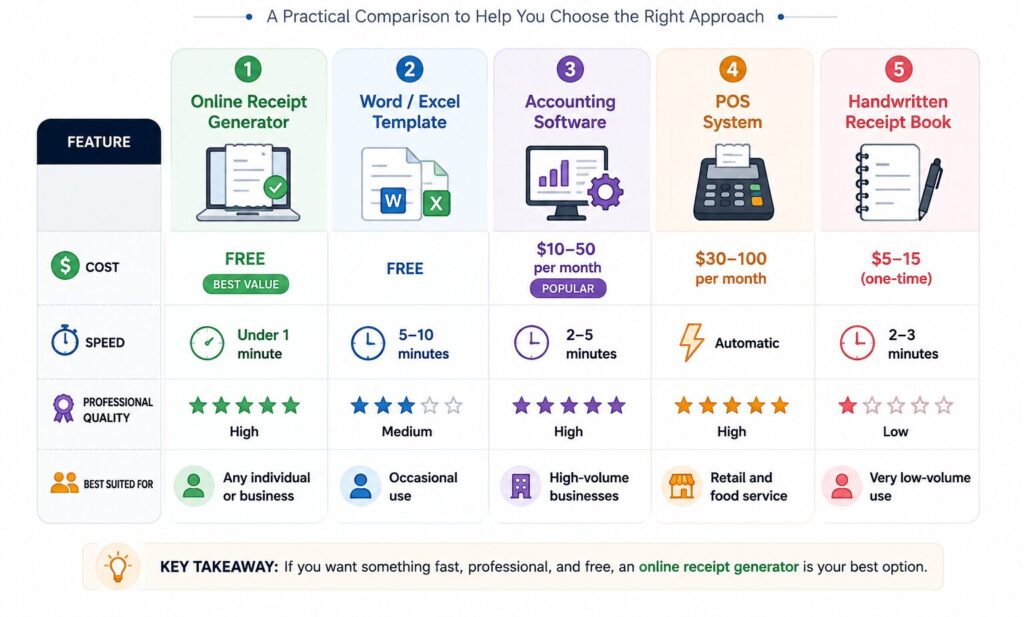
Five Methods for Creating a Receipt: A Practical Comparison
There is no single correct way to create a receipt. The right approach depends on how frequently you issue them, the level of professionalism required, and your available budget.
Method 1: Online Receipt Generator (Recommended)
For most individuals and small businesses, an online receipt generator offers the best combination of speed, cost, and output quality. Tools such as Simple Receipt Maker allow you to fill in your details, adjust the design to suit your brand, and download or share a high-resolution receipt image without creating an account or paying a subscription fee. This approach is particularly well-suited to freelancers, sole traders, and small business owners who need receipts on demand without the overhead of a full accounting suite.
Method 2: Word or Excel Receipt Template
Free receipt templates are widely available for Microsoft Word and Excel. You download the file, enter the transaction details, and save or print the result. This method is adequate for occasional use but becomes cumbersome at scale formatting can shift unexpectedly, and there is no automatic calculation of totals or taxes.
Method 3: Accounting Software
Platforms such as QuickBooks, FreshBooks, and Wave generate receipts as a by-product of recording payments. If your business already relies on accounting software, this is a natural workflow. However, for those who only need a receipt maker, subscribing to a full accounting platform is an unnecessary expense.
Method 4: Point-of-Sale System
POS systems from providers such as Square, Shopify, and Clover print or email receipts automatically at the point of transaction. These systems are indispensable for retail environments but represent a significant investment for low-volume operations.
Method 5: Handwritten Receipt Book
Physical receipt books, available from any office supply retailer, allow you to write details by hand and retain a carbon copy. While this method requires no technology, the results are less professional, harder to read, and more difficult to file and retrieve later.
How to Make a Receipt Using Simple Receipt Maker: Step-by-Step
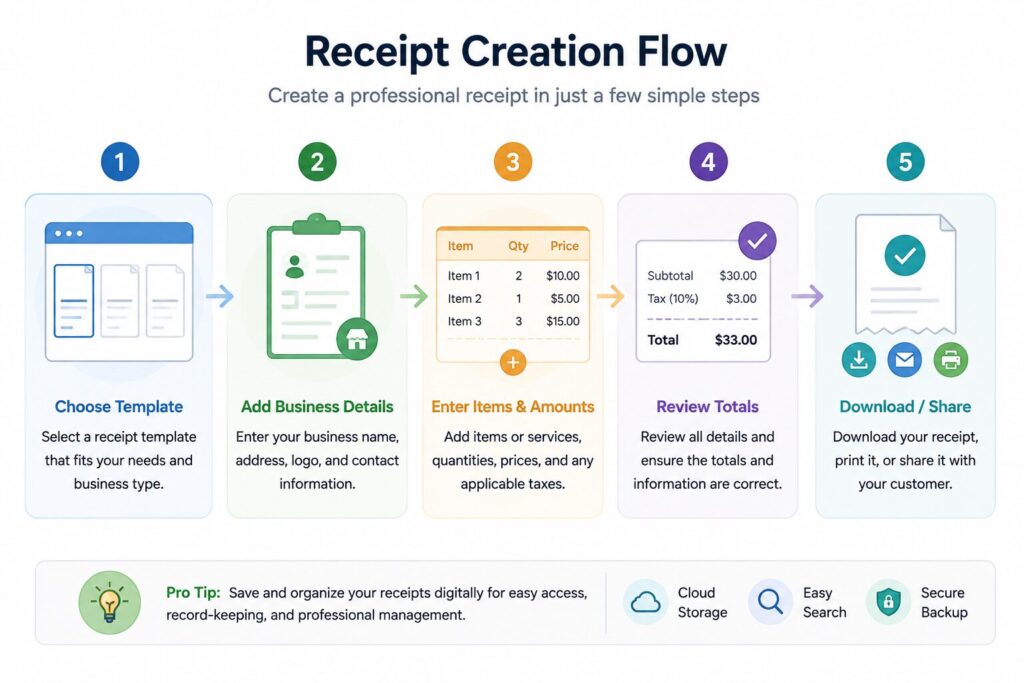
The entire process takes under 2 minutes. Here’s exactly how it works.
If you have never used an online receipt generator before, the process is straightforward. Here is a complete walkthrough using Simple Receipt Maker.
- Select a Template: Browse the available receipt templates and choose one that aligns with your industry. Options typically cover retail, food and beverage, professional services, and general transactions.
- Enter Your Business Details: Input your business name, address, and contact information. Upload your logo if you have one. These fields typically remain consistent across all receipts.
- Add Transaction Information: List each item or service provided, along with the quantity and unit price. Set your applicable tax rate, and the tool will calculate the subtotal, tax, and total automatically.
- Customise the Design: Adjust fonts, spacing, and layout to reflect your brand identity. A real-time preview updates as you make changes, so you can confirm the final appearance before downloading.
- Download and Distribute: Export your receipt as a high-quality PNG image. You can print it for in-person transactions, attach it to an email, or save it to your records.
→ Create your free receipt now at Simple Receipt Maker
Common Receipt Types and What Makes Each Unique
Not all receipts are identical. Different transaction types call for specific information to ensure the document is accurate, complete, and legally defensible.
Sales Receipt
The standard format for retail and product transactions. An itemised list of goods, unit prices, quantities, applied tax, and the final total are all required. Adding your return and refund policy at the bottom is advisable.
Service Receipt
When billing for services rather than physical goods, describe the nature of the work performed, the date it was completed, and the rate applied, whether hourly or as a flat fee. Include any materials or expenses passed through to the client.
Rental Receipt
Landlords should issue a receipt for every rent payment received. The document should reference the property address, the period the payment covers, the tenant’s name, and the payment method used. Many regions require landlords to provide rental receipts upon written request.
Cash Receipt
Because cash transactions leave no digital footprint, a clearly documented cash receipt is especially important. Record the exact amount received, the name of the payer, the purpose of the payment, and the date. Both parties should retain a copy.
Donation Receipt
Charitable organisations must issue receipts for contributions above a specified threshold, which varies by jurisdiction. The receipt must include the organisation’s registered charity number, the donation amount, the date received, and a declaration confirming that no goods or services were exchanged in return for the contribution.
What makes a receipt legally valid?
A receipt becomes legally significant when it contains the essential transaction details, seller identity, date, amount, and what was exchanged. While most jurisdictions do not mandate a specific format, a receipt can be used as evidence in disputes, tax audits, and reimbursement claims. Using a consistent, professional format ensures your receipts hold up when it matters.
Receipt Best Practices for Small Businesses
Producing a receipt is only part of good financial management. Adopting consistent habits around numbering, storage, and reconciliation will keep your records organised and audit-ready.
Use Sequential Receipt Numbers
Assign every receipt a unique sequential number (e.g., 0001, 0002, 0003). This creates an unbroken paper trail that simplifies bookkeeping and demonstrates transparency to tax authorities. Unexplained gaps in receipt sequences can attract scrutiny during an audit.
Retain Copies of Every Receipt You Issue
Maintaining a copy of each receipt is non-negotiable. Digital receipts make this straightforward, organise them into folders by month, client, or transaction type. Tax authorities in most jurisdictions recommend keeping financial records for a minimum of three to seven years depending upon state or country you pay tax. Read our guide on what happens if you get audited and don’t have receipts to understand the risks.
Maintain a Consistent Format
Using the same receipt layout for every transaction projects professionalism and makes discrepancies easier to identify. An online receipt generator is the simplest way to enforce this consistency without manual effort.
Display Tax as a Separate Line Item
In most jurisdictions, tax must be shown as a distinct line rather than embedded in the product price. If your business has a registered tax identification number, include it on every receipt.
Reconcile Receipts Against Your Accounts Regularly
Cross-referencing issued receipts against your accounting records, ideally on a weekly basis, catches errors early and makes the end-of-year process significantly less stressful.
Digital Receipts vs. Paper Receipts: Which Should You Use?
The transition away from thermal paper receipts continues to accelerate in 2026, driven by environmental concerns, consumer preference, and the practical advantages of digital storage.
Digital receipts are the superior choice for the majority of businesses. They cannot fade, cannot be misplaced, and can be retrieved instantly by name, date, or amount using basic search tools. They also eliminate the need for physical storage.
Paper receipts remain appropriate in environments where customers expect a printed copy at the point of sale, such as restaurants, supermarkets, and petrol stations or where local regulations specifically require a tangible document.
The most practical approach for most small businesses is to generate receipts digitally using an online tool, then offer to print a copy on request. This gives you the administrative benefits of a digital system while accommodating customers who prefer a physical record.
Frequently Asked Questions
Q: How do I make a receipt for free?
A: The fastest method is to use a free online receipt generator. Tools such as Simple Receipt Maker require no account registration or payment. Enter your transaction details, customise the design if desired, and download your receipt immediately.
Q: What information is legally required on a receipt?
A: Legal requirements differ by country and region, but most jurisdictions expect the following as a minimum: the seller’s name and contact details, the transaction date, an itemised list of goods or services, the amounts charged, any applicable tax, and the total amount paid. Consult your local tax authority for jurisdiction-specific requirements.
Q: How do I make a receipt for my small business?
A: Begin with a receipt template that includes your business name, logo, and address. Add the transaction specifics items, prices, tax, and total, along with a unique receipt number and the payment method used. Maintaining a consistent format across all transactions is strongly recommended.
Q: Can I create a receipt on a mobile phone?
A: Yes. Web-based receipt generators including Simple Receipt Maker are fully responsive and function on any device with a browser, including smartphones and tablets. The completed receipt can be downloaded directly to your phone for immediate use.
Q: How do I make a receipt for a cash transaction?
A: A cash receipt should document the date, the amount received, the purpose of the payment, and the names of both parties. Clearly note the payment method as cash, and ensure both the payer and recipient retain a copy.
Q: What is the difference between a receipt and an invoice?
A: An invoice is a formal request for payment issued before money changes hands. A receipt is a confirmation that payment has been received. In short: an invoice says “please pay this amount,” while a receipt confirms “this amount has been paid.” For more detail read our guide on the difference between a receipt and an invoice.
Q: Is it a legal requirement to provide a receipt for every sale?
A: This varies by jurisdiction. In many countries, businesses are not legally required to issue a receipt for every transaction below a certain value. However, providing receipts as a matter of course is considered best practice, as it protects both parties in the event of a dispute.
Q: How long should receipt records be retained?
A: Most tax authorities recommend keeping financial records for a minimum of three years from the date the relevant tax return was filed. In cases involving underreported income or business property, the retention period may extend to six years or beyond. Check the guidance issued by your local tax authority for precise requirements.
Q: What happens if I don’t give a customer a receipt?
A: In most countries, there is no universal law requiring a receipt for every transaction. However, the consequences of not providing one can be significant in practice. Without a receipt, customers have no proof of purchase, which makes returns, warranty claims, and expense reimbursements impossible to process. For your business, the absence of issued receipts creates gaps in your financial records that can raise questions during a tax audit. In cash-heavy businesses, missing receipts are one of the most common triggers for closer scrutiny by tax authorities. Some jurisdictions, including parts of Australia, Italy, and several US states, do legally require receipts above a certain transaction value. As a rule, issuing a receipt for every sale costs nothing and protects everyone involved.
Q: Can I make a receipt without a business name?
A: Yes. If you are making a receipt for a private sale, such as selling a car, furniture, or electronics between individuals, you do not need a registered business name. Simply use your full legal name in place of a business name, along with your contact details. The rest of the receipt remains the same: include the date, a description of what was sold, the amount paid, the payment method, and the names of both the buyer and seller. Both parties should retain a copy. For high-value private sales, this written record is especially important as it protects both the seller from future liability and the buyer from disputes over ownership.
Q: How do I number my receipts?
A: Receipt numbering is simpler than it sounds. The standard approach is to assign each receipt a unique sequential number starting from 0001 and incrementing by one with every new transaction — 0001, 0002, 0003, and so on. This creates an unbroken paper trail that makes bookkeeping straightforward and demonstrates transparency to tax authorities. Some businesses prefer a format that includes the year or month for easier filing, for example 2026-0001 or 0426-0001 for April 2026. Whatever format you choose, the key rule is consistency, never skip, reuse, or duplicate a receipt number. If you make an error on a receipt, void it with a note rather than deleting it, and move to the next number. Online receipt generators like Simple Receipt Maker handle sequential numbering automatically, so you never have to track it manually.
Start Generating Professional Receipts Today
Producing a well-structured, complete receipt does not need to be a time-consuming process. With the right tool, you can create a receipt that looks professionally designed, includes all legally relevant information, and is ready to download in under a minute.
Simple Receipt Maker is free to use, requires no registration, and gives you full control over every detail from the layout and typography to the tax rate and payment method. Whether you need one receipt or one hundred, the process is identical: fast, flexible, and professional.
→ Get started at Simple Receipt Maker — no signup required
Related Articles:
→ What’s the difference between a receipt and an invoice?
→ How to Send Receipts to Customers via WhatsApp?
→ What Happens if You Get Audited and Don’t Have Receipts?
© 2026 Simple Receipt Maker | simplereceiptmaker.com