
Taxi Receipt Generator
Create a professional Taxi receipt in under two minutes using our Taxi Receipt Generator. Fill in the details, download as PDF, and share or email — completely free.
- PDF, JPEG & PNG download
- Share through Whatsapp or Send Email
- 7 Taxi and rides receipt templates
- All related fields included
- Digital signature
Why Every Ride Needs a Written Receipt
A taxi receipt is more than a payment confirmation. For passengers, it’s the document needed to file a travel expense claim, request a business reimbursement, or resolve a billing dispute. For drivers and operators, it’s a record of every fare that supports accurate income reporting and protects against chargebacks.
Whether you drive a licensed cab, run a private car service, or operate a rideshare account, our free taxi receipt generator gives you a properly formatted fare receipt in under two minutes with your business name, driver details, trip route, distance, fare breakdown, and payment method all in one document. Download as PDF or PNG instantly, or send directly to your passenger by email or through whatsapp.
Taxi & Rides Receipt Templates Offered by Our Taxi Receipt Generator
1. Taxi Receipt
The standard template for licensed taxi operators, cab companies, and metered fare services. Uses a narrow thermal layout in classic monospace, the same style passengers recognize from printed cab receipts worldwide.
What this template captures:
- Passenger name
- Trip ID — displayed prominently at the top of the receipt for easy reference
- Driver name and driver license or badge number
- Vehicle make, model, and plate number
- From and to — pickup and drop-off locations
- Distance and duration of the trip
- Base fare, rate per mile, distance charge calculated automatically
- Wait time charge
- Tax
- Payment method (cash or card)
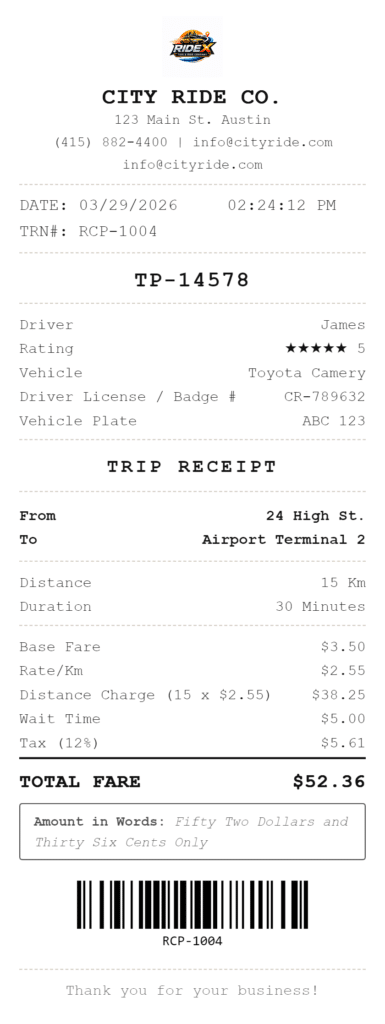
The fare breakdown is the key feature here. Rather than showing a single total, the receipt itemizes base fare, distance charge, and any surcharges separately — giving the passenger a transparent breakdown they can verify and submit for reimbursement.
2. Rideshare Receipt
Built for independent rideshare drivers and app-based ride-hailing operators who need a receipt they can issue directly to passengers, particularly for corporate clients who need something more formal than an in-app screenshot.
What this template captures:
- Passenger name
- Trip ID
- Driver name and rating — shown with star icons on the receipt
- Vehicle details and plate number
- From and to locations
- Distance and duration
- Trip fare, booking fee, and surge pricing — each as separate line itemsTip
- Payment method (cash, app pay, card)
- You can also add Tip.
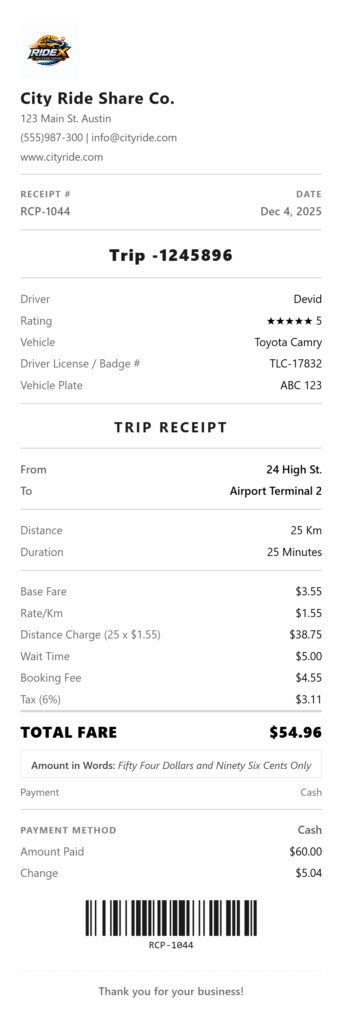
The tip field and separate “Total with Tip” calculation is exclusive to this template. For drivers who accept cash tips in addition to app payments, this field lets them issue a single receipt showing the full amount received, which matters for accurate income records.
3. Luxury Car Service Receipt
For chauffeur services, black car operators, executive transport companies, and limousine hire. The Luxury Car template uses a serif font on a linen texture with a double border, a refined look that matches the premium nature of the service.
What this template captures:
- Passenger name
- Booking reference number displayed on the receipt for pre-booked services
- Chauffeur name and chauffeur license number (labeled “Chauffeur License #” rather than the standard driver badge label)
- Vehicle class (e.g., Business Class, First Class, Limousine)
- Vehicle details and plate
- From and to locations
- Rate according to distance
- Surge Price
- Airport surcharge
- Gratuity
- Payment method
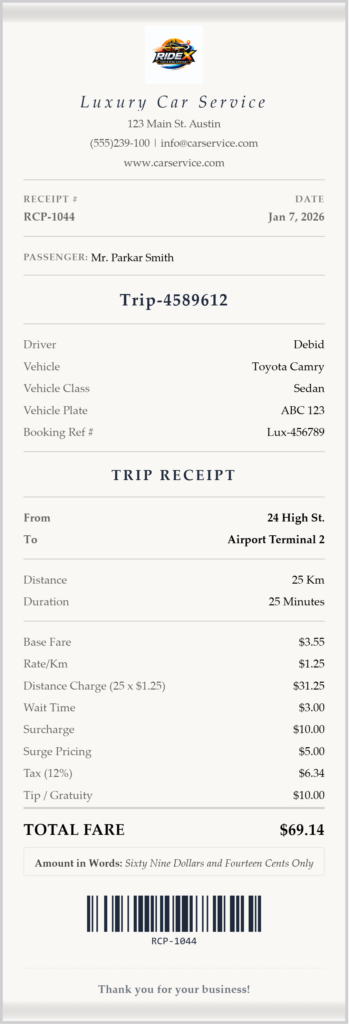
The vehicle class and booking reference fields distinguish this from a standard taxi receipt. Corporate clients booking executive transport typically need both on an expense receipt, the booking reference to match their reservation, and the vehicle class to confirm the service tier they were billed for.
4. Airport Shuttle Receipt
For airport transfer services, shared shuttle operators, and hotel transfer companies. The Airport Shuttle template uses a wide table layout with a blue accent, clean and official, suited to a travel context where passengers are often filing the receipt with an employer or travel management system.
What this template captures:
- Passenger name
- Driver name
- Vehicle details and plate
- Flight number, so the receipt can be matched to a travel itinerary
- Terminal
- Number of passengers
- Number of bags
- From and to (pickup location and destination)
- Distance and duration
- Shuttle fare, luggage handling fee (Surcharge fee), and booking fee as separate line items
- Tax
- Payment method
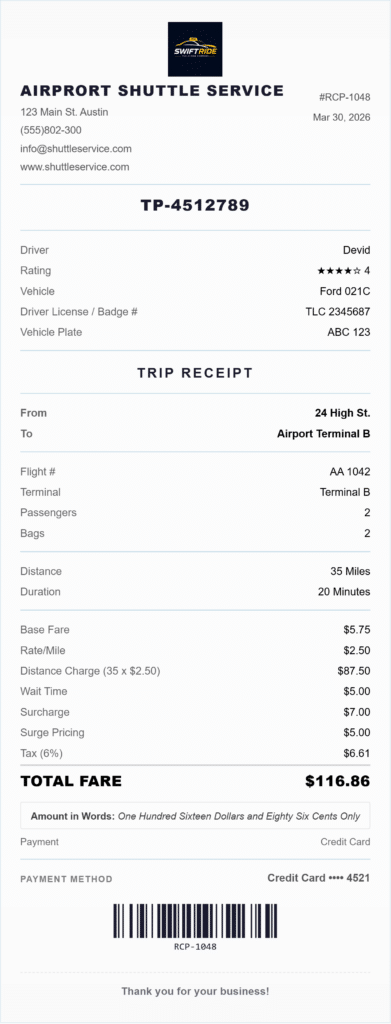
The flight number and terminal fields are exclusive to this template. For business travelers, having the flight number on the shuttle receipt ties the ground transport directly to the trip — making it straightforward to submit with an expense report without attaching additional documentation.
5. Car Rental Receipt
A full-featured car rental receipt for independent car hire companies, dealership rental desks, and peer-to-peer vehicle rental operators. The Car Rental template uses a wide split-header layout — structured and document-like, appropriate for a transaction that involves a formal rental agreement.
What this template captures:
- Renter name and address
- Rental agent name
- Agreement number — linked to the rental contract
- Vehicle make, model, year, color, category, and plate
- Pick-up date and location
- Return date and location — if different from pick-up, shown as a separate field (one-way rental)
- Odometer out and odometer in — miles driven calculated automatically
- Mileage included and overage charge — calculated automatically if driven mileage exceeds the included allowance
- Fuel level out and fuel level in
- Fuel charge if applicable
- Daily rate and total rental charges calculated for the number of days
- Insurance or protection plan and cost
- Additional driver fee
- Young driver surcharge
- One-way fee
- Extras (GPS, child seat, etc.) and cost
- Security deposit — deducted from the total automatically
- Tax
- Payment method and card authorization code
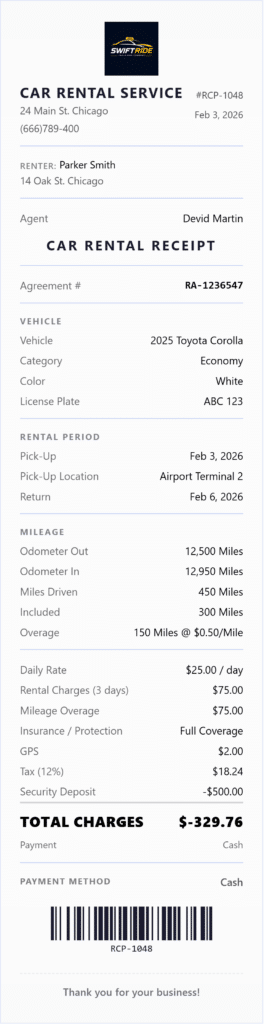
The odometer and mileage overage calculation is the standout feature. Rather than asking you to calculate overage charges manually, the template does it automatically once you enter the odometer readings and the included mileage allowance — the overage quantity and charge appear as separate lines on the receipt.
6. Towing and Roadside Assistance Receipt
For towing companies, roadside assistance operators, and breakdown recovery services. The Towing template uses a wide split-header layout with an amber accent — practical and easy to read in a roadside context where both the operator and vehicle owner need a clear record of the service.
What this template captures:
- Vehicle owner name and address
- Service type (tow, jump start, flat tyre, fuel delivery, lockout, winch-out)
- Vehicle year, make, model, color, and plate — so the receipt is tied to the specific vehicle recovered
- Service location — where the breakdown occurred
- Destination — where the vehicle was towed to
- Tow distance and rate per mile
- Hook-up fee
- Storage fee if applicable
- Call time and arrival time — both recorded on the receipt
- Authorization number — the owner’s signed consent reference
- Insurance claim number — for AAA, roadside insurance, or fleet claims
- Payment method
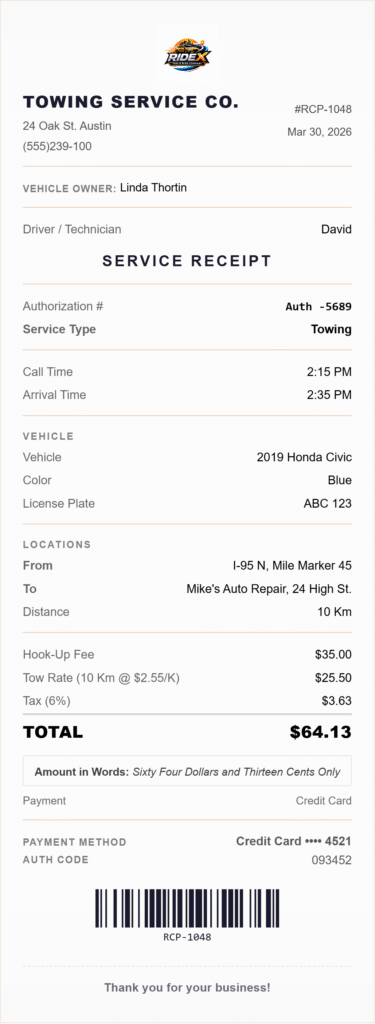
The call time and arrival time fields are unique to this template. For insurance claim purposes, the time gap between call and arrival is often a required field on claim forms. Having both on the receipt means the vehicle owner has everything they need to file with their insurer without requesting additional documentation from the tow operator.
7. Bike Rental Receipt
For bicycle rental shops, cycling tour operators, e-bike hire stations, and trail rental services. The Bike Rental template uses a kraft-paper texture with a green accent — casual and outdoorsy, matching the context of most bike rental businesses.
What this template captures:
- Renter name
- Staff member name
- Bike ID or serial number
- Bike type (city bike, mountain bike, e-bike, tandem, cargo)
- Rental start time and return time
- Quantity billed in hours
- Helmet rental fee
- Lock and cable fields
- Damage waiver — yes or no, with fee shown separately
- Security deposit — shown as a separate line below the total
- Bike condition on handover — a written note on the state of the bike at the time of rental
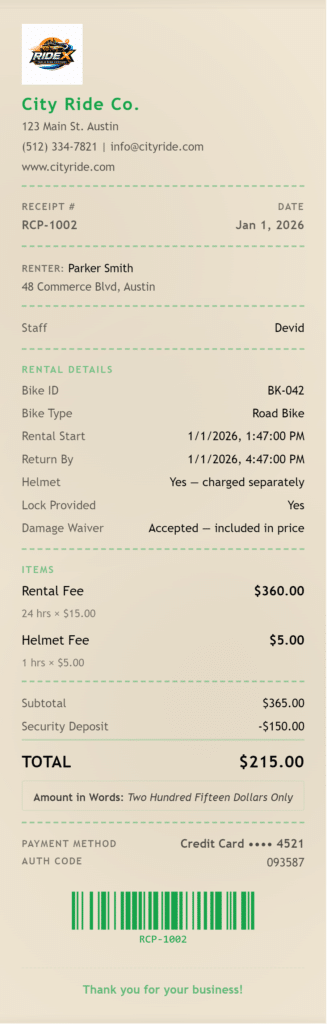
The bike condition field protects both parties. If a bike is returned with damage, the condition note on the original receipt establishes its state at the time of rental — making it clear whether the damage was pre-existing or occurred during the hire period.
What Every Taxi and Ride Receipt Should Include
Regardless of which template you use, a complete taxi fare receipt or ride receipt should always contain:
Operator information — business or driver name, contact number, and any relevant license or permit number. Passengers filing expense claims often need the operator’s details to match the receipt to their booking.
Passenger or renter name — so the receipt can be matched to the individual who took the trip or hired the vehicle.
Receipt number and date — a sequential receipt number makes record-keeping straightforward and gives both parties a reference for any follow-up.
Trip or service details — pickup and drop-off locations, distance, and duration for rides; vehicle details and rental period for car hire; vehicle recovered and service location for towing.
Itemized charges — list each charge separately. Base fare, surcharges, tolls, booking fees, and taxes should each appear as individual line items so the passenger can reconcile the total.
Payment method — cash, card, app pay, or insurance. For drivers and operators, this matters for income reconciliation. For passengers, it confirms how the transaction was settled in case of a dispute.
Tax line — if you charge tax on fares or rental fees, the tax field lets you enter a rate and label it correctly (Sales Tax, GST, VAT). Tax obligations for transportation and vehicle rental businesses vary by state and business structure — check with your accountant if you are unsure what applies to your operation.
Frequently Asked Questions
Can I use this as an Uber or Lyft receipt for expense claims?
Yes. The Rideshare template is designed for exactly this purpose — drivers and passengers who need a formal ride receipt that can be submitted as a business expense. It includes trip ID, from and to locations, fare breakdown, and payment method, which are the fields most expense systems require.
Can I create a taxi receipt for a business trip reimbursement?
Yes. The Taxi Receipt template and Rideshare template both produce a properly formatted fare receipt with driver details, trip route, distance, and an itemized fare breakdown — everything a company’s accounts payable team typically needs to process a travel reimbursement.
Does the car rental receipt calculate mileage overage automatically?
Yes. Enter the odometer reading at pick-up, the reading at return, the included mileage allowance, and the overage rate. The template calculates miles driven, overage miles, and the overage charge automatically and displays each as a separate line on the receipt.
Can I add a security deposit to a car rental or bike rental receipt?
Yes. Both the Car Rental and Bike Rental templates have a security deposit field. The deposit is shown as a deduction below the subtotal, so the receipt clearly shows the rental charges, the deposit held, and the net amount due.
Can I use the towing receipt for an insurance claim?
Yes. The Towing and Roadside template includes a dedicated insurance claim number field, plus call time, arrival time, service location, and vehicle details — the fields most roadside insurance claim forms require. The receipt gives the vehicle owner a single document to attach to their claim.
Does the airport shuttle receipt include flight details?
Yes. The Airport Shuttle template has dedicated fields for flight number and terminal. These fields are unique to this template and are particularly useful for corporate travel where the ground transport receipt needs to be matched to a specific flight booking.
What file formats can I download using Taxi Receipt Generator?
PDF, PNG, and JPEG. PDF is best for printing, archiving, and submitting with expense claims. PNG and JPEG work well for emailing or attaching to a message. You can also print directly from the browser or send by email without downloading.
Can I add my taxi company or car service logo?
Yes. All seven templates support logo upload in PNG, JPG, or SVG format. The logo appears in the receipt header, which is particularly useful for branded car services and limousine companies.
Is this Taxi Receipt Generator free to use ?
Yes. The taxi receipt generator is completely free. No account required, no subscription, and no watermark on the downloaded file.
Related Receipt Generators
Other free tools from Simple Receipt Maker